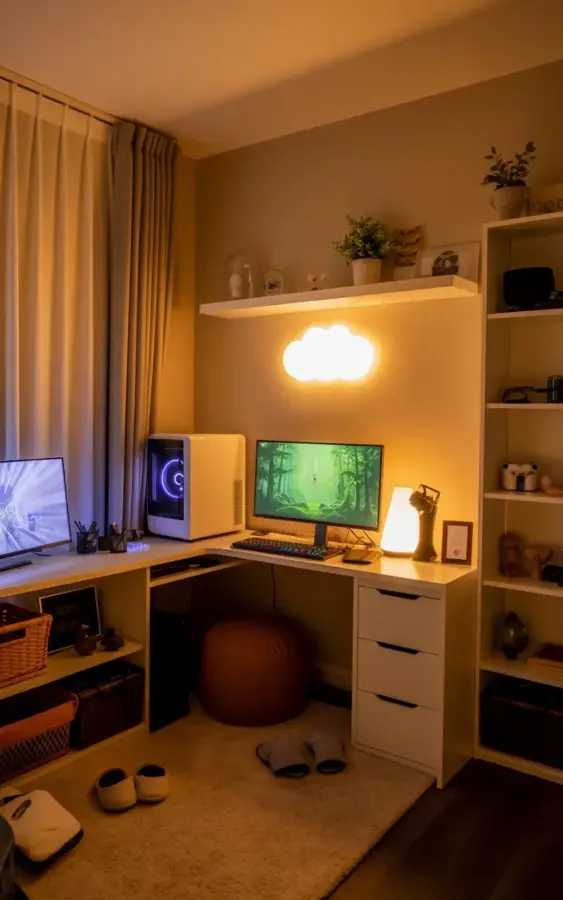
The room is dim, the cloud light hums softly on the wall, and my two monitors glow with a slow green forest scene. That’s the moment I know the whole setup is working. This gaming setup took about six weeks to piece together, and honestly, most of it came from sales, secondhand finds, and a few smart swaps I almost skipped.
I started with a plain white L-shaped desk that had zero personality. No lights, no shelves, no pouf. Just a bare corner that looked like a waiting room. Now it’s my favorite place in the apartment, and I’m going to tell you exactly how I did it without pretending I spent four thousand dollars, because I didn’t.
How to start a cozy gaming setup on a budget
Before you buy anything, look at what you already own. That’s the boring truth nobody puts on their Pinterest board. I had a basic office chair, one older monitor, and a desk lamp that was too bright. So I worked with those first.
My biggest tip is to set a hard number. I told myself $500 total, including the desk, and stuck to it. That forced me to hunt for deals instead of impulse buying. Here’s what actually helped:
- Check Facebook Marketplace and Craigslist for white desks and monitor arms. People sell them cheap when they move.
- Wait for holiday sales on PC parts and peripherals, especially around Memorial Day and Black Friday.
- Buy open-box monitors from Best Buy or Amazon Warehouse. Nobody will see the box.
- Swap out the desk lamp for a smart bulb that changes color temperature.
- Skip the expensive cable management kits and use zip ties plus a cheap under-desk tray.
The desk itself was a lucky find. I got a white L-shaped model with black drawer handles for $120 from someone who was downsizing. It had a few scuffs, but a magic eraser took care of most of them. That’s the whole secret, honestly. You don’t need a brand new desk, you need a desk that doesn’t fight the rest of the room.
Choosing the right white L-shaped desk for your space
An L-shaped desk changes how a room feels. It corners off the space and gives you separate zones for work and play. Mine is against a beige wall, so the white top pops without feeling sterile.
Measure your room before you commit. I almost bought a massive L-desk that would have blocked the closet door. You want the short side against the wall and the long side where you sit. That gives you a natural spot for your PC on one end and your coffee cup on the other.
If you want drawer space, make sure the drawers don’t hit your legs when you spin around. That’s a mistake I made with a previous desk. The black handles on mine are actually a plus, they hide fingerprints, and white desks get dirty fast if you eat at them like I do.
Dual monitor ideas for a cleaner desk setup
Two monitors are the backbone of this desk setup. I run one 27-inch and one 24-inch, both on a single dual monitor arm. The arm was about $35 and it freed up a huge amount of table space. No more giant plastic stands taking over the corners.
The trick is to line them up at the same height and angle them slightly toward your chair. When one is a forest wallpaper and the other has Discord open, it all feels intentional. You don’t need matching monitors either. Honestly, mismatched sizes work fine as long as the bezels are thin.
Use the monitor arm to hide your cables. Route them down the back of the desk leg and zip tie them. The cleaner the monitors sit, the cozier the whole setup feels. Nothing kills a vibe like a spaghetti mess of wires visible from across the room.
Adding warmth with cloud LED lights and soft lighting
The cloud light on the wall is the single most dramatic change I made. It’s a white LED cloud-shaped fixture that casts a warm glow across the room. I found mine for $28 online, and it took fifteen minutes to mount.
At night, I turn off the main ceiling light and let the cloud glow carry the room. The difference is night and day. The white PC case reflects the light nicely, and the beige carpet picks up a soft golden tone that makes everything feel more welcoming.
If you don’t want a cloud, use a smart LED strip behind the desk or a warm lamp with a paper shade. The key is to avoid harsh white light. You want something that feels like sunset, not a hospital. Honestly, I set my smart bulb to 2700K and never touch it again.
Floating shelves and plants for game room personality
Above my desk, I mounted a white floating shelf about a foot above the monitors. It’s the kind of shelf that looks invisible, so the items on it become the focus. I put three small potted plants on it, two fake and one real, because I can’t keep a succulent alive for more than a month.
Also on the shelf, a few decorative items I already owned. A tiny wooden block, a ceramic mushroom, and a small framed print. That’s it. The empty space matters more than the stuff.
Plants in a game room do two things. They break up all the flat surfaces that electronics create, and they give your eyes something to rest on instead of a glowing screen. The fake ones are fine if you don’t get natural light in that corner. Just dust them once in a while, and they’ll look alive.
Seating options that don’t break the bank
A brown pouf sits next to my desk, and it’s the most used piece of furniture in the whole setup. Not gonna lie, it’s not for gaming. It’s for when a friend stops by or when I want to prop my feet up while waiting in a matchmaking queue.
Poufs are cheap, usually around $25 to $40. I picked mine up at a discount home goods store, and it matches the beige carpet well enough that people think I planned it. You don’t need a second expensive chair. That’s overkill unless you host LAN parties every weekend.
For the chair you actually sit in, I upgraded slowly. I used a wooden kitchen chair for two months and then found a used ergonomic office chair for $60. That was worth it. Your back will thank you, and the pouf handles the rest.
Final touches for a cozy gaming corner
The last little details are what turn a functional setup into a place you actually want to be. I added a small felt mousepad, a phone stand, and a little dish for my keys and headphones. None of these cost more than ten dollars.
One thing I didn’t expect was how much the forest wallpaper on the monitors would affect the mood. The green glow bounces off the white desk and makes the whole corner feel like a cabin in the woods. It’s free too, just search for forest wallpaper on whatever background site you use.
Take your time with the layout. I rearranged the monitors twice and moved the cloud light three inches to the left before it felt right. That’s normal. A cozy gaming setup isn’t built in one afternoon, it’s built by making small adjustments when something bothers you.
Save this post if you’re planning your own transformation. Even if your budget is tiny, start with one change, maybe the cloud light or a monitor arm, and see how it shifts the whole room. You’d be surprised what a corner becomes when you give it a little attention.
Leave a Comment