Why This Dual Monitor Setup Works for Both Play and Work
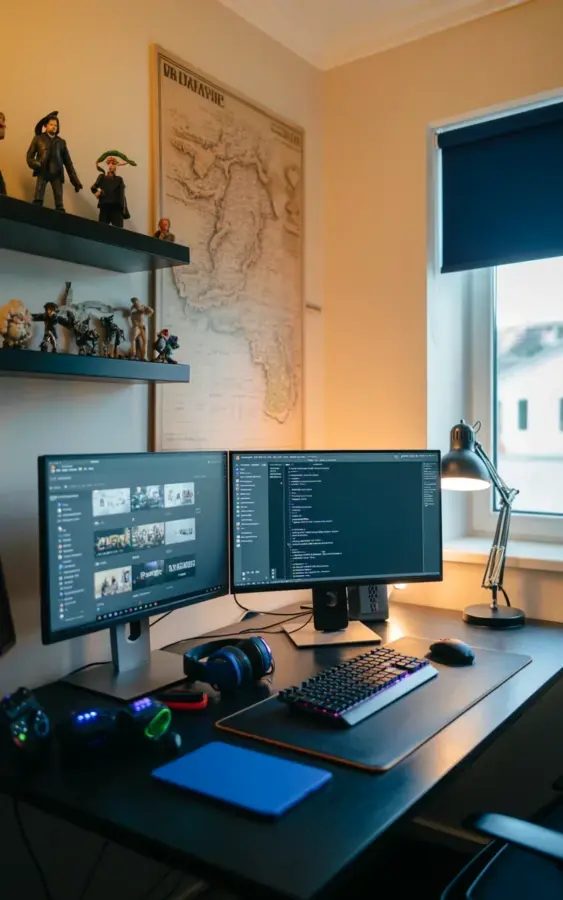
If you’ve been searching for a dual monitor desk setup that actually supports both gaming marathons and long coding sessions, you’re not alone. I stumbled on this photo while planning my own home office refresh, and it stopped me mid-scroll. The left monitor shows a grid of game thumbnails (perfect for browsing a backlog or managing a stream), while the right monitor runs a dark coding theme with clean syntax highlighting. That visual split isn’t just for looks. It mirrors how many of us actually work and play in the same space, especially during the darker winter months when staying productive at home requires a little extra intentionality.
Creating a Cozy Dual Monitor Workspace for Winter 2025
Winter is the season when your desk setup matters most. Short days and cold weather mean you’ll spend more time in your home office, so it needs to feel warm without being cluttered. This particular cozy dual monitor workspace nails that balance. The black desk anchors everything without shouting for attention, letting the vintage map above the monitors do the heavy lifting for personality. I love how the sepia tones of the map contrast with the cool glow of the screens. It’s a look that feels intentional, not accidental. For your own space, I’d recommend choosing one piece of wall art that sets a nostalgic or adventurous tone. A map works especially well because it doesn’t compete with monitor glare the way a glossy poster might.
How to Blend Gaming and Programming on One Desk
One of the trickiest parts of a gaming and programming home office is keeping both activities functional without constant cable swapping or input lag. In this photo, the solution is simple and effective. The left monitor (gaming) is angled slightly toward you, and the right monitor (coding) sits at a matching height. That symmetry matters because you don’t want to crane your neck when you switch between games and code. I’d suggest setting your main gaming screen on the left if you’re right-handed (your mouse hand stays free) and your coding monitor on the right for reading documentation. The ultrawide-ish proportions in the photo also hint at 27-inch panels, which is a sweet spot for multitasking. Don’t forget to adjust your refresh rates: 144Hz on the gaming side, and a solid 60Hz or 75Hz on the coding side to save power and reduce eye strain during long debug sessions.
Must-Have Accessories for a Sleek Black Desk Setup
A black desk can look sterile if you don’t add the right touches. This setup avoids that trap with three key accessories. The black mechanical keyboard with a compact layout keeps the surface clean, and the full-size black mousepad (wide enough for both keyboard and mouse) anchors the entire work zone. Then there’s the adjustable desk lamp, which sits on the right side and casts warm light onto the keyboard. That lamp is a game changer for late-night coding in winter when natural light fades by 4 p.m. Here are a few other desk accessories I’d recommend for a similar vibe:
- A monitor light bar that clips onto your main screen to reduce glare without taking desk space
- One small plant (fake or real) near the lamp to soften the all-black aesthetic
- Cable ties or a magnetic cable clip to keep cords out of sight behind the desk legs
- A wireless charging pad tucked under the monitor stand for your phone
Vintage Map Wall Art and Other Home Office Decor Ideas
The vintage map in this photo is what takes the setup from “gaming den” to “home office decor inspiration. It’s large enough to fill the wall above both monitors without feeling overwhelming. Maps also have a subtle storytelling quality that works well for programmers and gamers alike. You can find similar sepia-toned prints on Etsy or at thrift stores. If a map doesn’t fit your personality, try a framed fabric tapestry in earth tones, or a single large canvas with muted lines. The key is to keep the wall decor matte (no glass reflection) and at least a foot above the monitor tops so you don’t block your view. I personally switched out a bright poster for a secondhand world map last fall, and it made an enormous difference in how “settled” the room feels.
Adjustable Desk Lamp for Late Night Coding Sessions
That black adjustable lamp on the right side of the desk isn’t an afterthought. Good task lighting is essential when you’re staring at a dark coding theme for hours, especially during a December push to ship a project before holiday break. The lamp’s arm in the photo looks like it can pivot and tilt, which means you can direct light exactly where you need it and avoid washing out your screen. I’d recommend choosing an LED lamp with multiple color temperatures. A warm 2700K setting for relaxed gaming sessions after dinner, and a cooler 5000K setting for focused coding in the afternoon. Many adjustable lamps now include a USB port in the base, which is perfect for charging a controller or a wireless mouse. That small convenience keeps your desk cables to a minimum.
Mechanical Keyboard Selection for Your Dual Monitor Setup
The keyboard in this photo is a compact mechanical model, likely a tenkeyless or 75% layout. That choice is smart for a dual monitor desk setup because it saves width and leaves room for your mouse to move freely. If you switch between gaming and programming, look for a board with hot-swappable switches. That way you can swap from quiet linear switches (great for code) to tactile or clicky switches (fun for gaming) without buying a second keyboard. I use a Keychron Q1 with Gateron Browns, and it’s been a solid middle ground. Also, check that your keyboard has per-key RGB lighting that can be set to a static color (like white or dim purple) so it doesn’t distract from the screens. The solid black color in the photo helps it blend into the desk, keeping the visual focus on the monitors and the map above.
Organizing Cables and Keeping the Black Desk Clean
A black desk shows dust and cable clutter more than a wood grain surface does. In this photo, cables are invisible, which means the owner likely uses adhesive cable clips routed along the desk’s underside and a power strip mounted under the tabletop. I’ve done the same in my own setup, and it takes about an hour to set up but saves you months of frustration. A few practical tips: use Velcro ties instead of plastic zip ties (easier to adjust), label the ends of each cable with a bit of tape, and route monitor cables through the stand’s built-in cable management channel. If your monitors don’t have that feature, a simple cable sleeve from the desk to the floor works fine. The goal is to see only the bare minimum of wires, which helps the desktop feel as clean as the one in the photo.
Making This Setup Your Own This Season
You don’t need to copy every detail to capture the same balance of productivity and relaxation. If you’re setting up your dual monitor desk setup this winter, focus on three things: a dark, practical desk surface, wall art that brings warmth without reflection, and a lamp that can shift from task lighting to ambient glow. Start with the monitors, then build around them. I swapped my mousepad for a larger one after seeing this photo, and it made a bigger difference than I expected. Now, every time I sit down to code or play, the workspace feels ready for both.
If this setup resonates with you, save the image to your own home office inspiration board. It’s one of those rare combinations that actually works in real life, not just on screen. Have you tried a map or similar vintage decor in your workspace? Let me know what small change made the biggest difference for your comfort and focus this season.
#DeskSetup #GamingSetup #ProgrammingWorkspace #HomeOfficeDecor #DualMonitorSetup
Leave a Comment