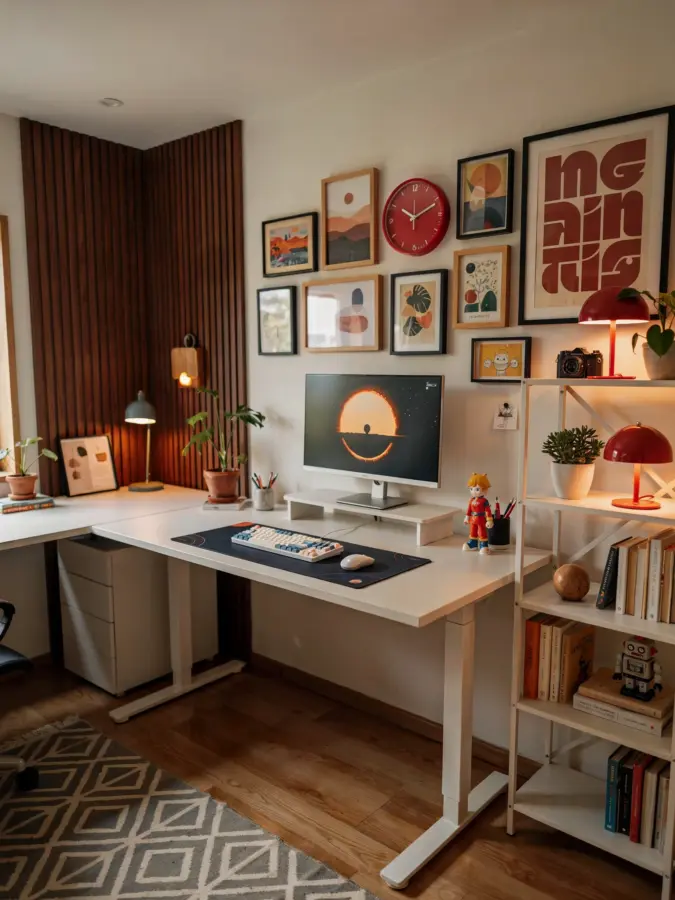
If you have been scrolling through social media lately, you have probably seen those picture perfect home office desk setups with sleek monitors, fancy plants and a color palette that costs more than my rent. I used to think I needed a thousand dollar budget to create something that would actually help me focus and get work done. But after spending the last few years testing different layouts and swapping out cheap components for smarter ones, I realized you can build a truly effective HomeOfficeDeskSetup on a real world budget. You do not need to win the lottery to make your small space feel like a productivity powerhouse.
Choosing the Right Desk for a Small Office Space
The first hurdle is usually physical space. If you are squeezing a desk into a corner of the living room or a narrow nook, you need to be honest about measurements before you buy anything. I have made the mistake of ordering a massive L shaped desk only to have to return it because I could not open my closet door. For a SmallOfficeDesk, look for something between 40 and 48 inches wide. That gives you enough arm room without swallowing the room.
If you are on a tight budget, check Facebook Marketplace or local buy nothing groups. I found a solid wood desk for thirty bucks that just needed a quick sanding and a coat of paint. You can also consider a simple folding table from a hardware store. It is not fancy, but it works great for a starter setup. The key is to have a stable surface that does not wobble when you type.
- Measure your space including door swings and chair clearance.
- Look for secondhand solid wood desks instead of cheap particleboard.
- A folding table can be a temporary solution that lasts years.
- Corner desks are good for small rooms if you use the corner depth wisely.
Ergonomic Furniture That Does Not Break the Bank
You probably know that comfort matters for long work days, but the price tags on ergonomic chairs can be scary. I have tried the expensive mesh chair at a coworking space and then bought a fifty dollar used Steelcase from a surplus office supply store. It needed a bit of cleaning and one new caster, but it works perfectly. ErgonomicHomeOffice does not have to mean buying a new name brand chair. You can also improve your existing chair with a cheap lumbar cushion or a rolled up towel tied to the backrest.
For your desk height, a simple rule is that your elbows should be at a 90 degree angle when you type. If your desk is too high, you can place a sturdy box or a stack of books under your keyboard and mouse. Yes, it looks a little rough, but it stops wrist pain. I kept a cardboard box covered with a nice cloth for months before I saved up for a proper keyboard tray. Nobody sees it except you and your cat.
Standing Desk Options on a Shoestring
Standing desks are great for breaking up long sitting periods, but the motorized ones can cost as much as a used car. I found a cheaper route: a desk converter or a simple riser that sits on top of your existing desk. There are affordable models around sixty dollars that lift your monitor and keyboard with a gas spring. Place it on a sturdy table and you have a standing setup for a fraction of the price.
Another option I have used is a stack of sturdy milk crates turned upside down. Put your monitor on the top crate and your keyboard on a lower one. It is not pretty, but it works for trying out standing before you invest. Just make sure everything is stable so you do not send your coffee flying. The whole point of these DeskSetupIdeas is to be practical and adjustable without requiring a second mortgage.
Manage Cables Without Spending a Fortune
Cable clutter is one of those things that drives me crazy but I used to ignore because I thought it needed expensive clips and trays. Actually, you can use simple binder clips to hold cords against the edge of your desk. A cheap roll of velcro cable ties from a dollar store keeps everything bundled together. If you have a metal desk frame, use magnetic hooks to run cables underneath. For a wooden desk, I used a few command strips and a toilet paper tube as a cable concealer. Seriously, it works.
Keeping cables organized helps your brain feel less chaotic. When I finally tucked all those loose wires out of sight, my small desk suddenly felt twice as big. It is one of the cheapest upgrades you can make for your ProductivityTips toolbox. You can even label the ends with masking tape and a marker so you know which cord goes to what without unplugging everything.
Lighting and Monitor Setup for Eye Comfort
Bad lighting is a silent productivity killer. I used to work under a harsh overhead ceiling light that gave me headaches by two p.m. The fix was a simple desk lamp with an adjustable arm, which I got at a thrift store for five dollars. Position it so it shines on your work, not into your eyes. A warm LED bulb around 3000K helps reduce strain without making you sleepy.
Your monitor height is also crucial. Stack a couple of sturdy books or a shoebox under your monitor to bring the top of the screen to eye level. That tip alone made my neck pain disappear. If you use a laptop, get a cheap laptop stand or just prop it on a thick cookbook. External keyboards are only ten to fifteen dollars and make a huge difference. Your posture will thank you.
Budget Friendly Add Ons That Boost Focus
You do not need a fancy plant wall or a giant whiteboard to stay on task. Small, intentional items can make a big difference. I use a simple timer app on my phone to do twenty five minute work sprints, but a physical kitchen timer works even better if your phone distracts you. A corkboard from the dollar store lets me pin notes and reminders without digital noise. Even a small scented candle or a diffuser with peppermint oil helps me signal that it is work time.
Another cheap trick: use a notebook for a daily to do list instead of a new gadget. Writing with a pen feels satisfying and keeps your screen clear. If you share your space with others, a folding room divider or even a large cardboard sheet painted with chalkboard paint can give
#HomeOfficeDeskSetup #DeskSetupIdeas #ErgonomicHomeOffice #SmallOfficeDesk #ProductivityTips
Leave a Comment