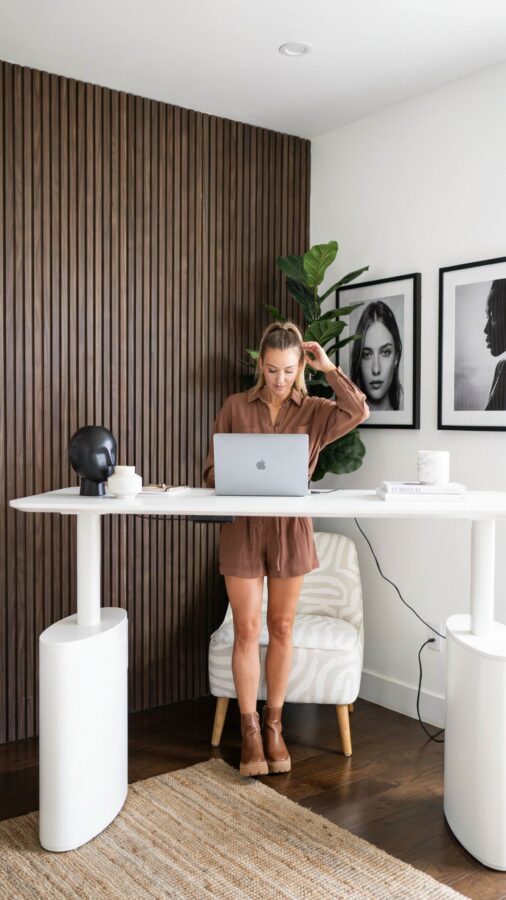
If you work from a small space, finding the right standing desk can feel like searching for a unicorn. I went through three desks before I settled on the Athena Ergonomic Height Adjustable Desk, and honestly, it changed how I think about my home office setup. This isn’t another generic review. Consider this a straightforward, step by step guide to actually making a compact adjustable desk work for you. No fluff, just real talk about boosting productivity and saving your back in a tiny corner of your home.
1. Measure Your Small Space Before Buying a Height Adjustable Desk
Here is the step most people skip. I almost bought a desk that was two inches too wide for my nook. Before you click buy on any HeightAdjustableDesk for your home office, grab a tape measure. You need to know your floor footprint and your ceiling clearance.
Standing desks need at least 28 to 30 inches of depth for a monitor and keyboard. For width, look at the Athena model which comes in a 47 inch size perfect for tight spots. Leave at least 4 inches on each side for cables and airflow. Trust me, a desk that wedges in is a headache you do not need.
2. Set Up Your Ergonomic Desk for Neutral Wrist Posture
Once you unbox your ErgonomicDesk, the real work begins. Don’t just plug it in and start typing. The whole point of a height adjustable desk is to align your body properly. When sitting, adjust the desk height so your elbows form a 90 degree angle and your wrists stay flat, not bent up or down.
For standing, raise the desk until the top of your monitor sits at or just below eye level. If you only have a laptop, get a separate riser. I keep a small notebook underneath my laptop stand to get that extra inch. Your shoulders should be relaxed, not hunched forward.
3. Cable Management Essentials for a Clean WFH Workspace
A small desk gets cluttered fast. Cables are the enemy of a clean HomeOffice. Here is a short checklist that made a huge difference in my setup:
- Use a cable tray that clips under the desk (measure the tray against the desk frame before buying).
- Label your plugs with washi tape so you know what is what when you move the desk up or down.
- Bundle loose cords with velcro straps, not zip ties. You will adjust things later. Trust me.
- Route cords along the leg of the standing desk using adhesive clips. Keeps them out of your feet when you switch positions.
Doing this once takes twenty minutes. Skipping it means tripping over wires every time you raise the desk. I learned that the hard way.
4. Find the Right Anti Fatigue Mat for Standing Sessions
Standing on a hard floor for hours is not kind to your knees or lower back. When I first got my Athena desk, I thought I would just stand on the carpet. Big mistake. After two days I was sore and annoyed. An anti fatigue mat is an absolute WFHEssentials item for anyone using a standing desk regularly.
Look for a mat with a beveled edge so you don’t trip. I use a 24 by 36 inch mat that fits perfectly under the desk. It gives me room to shift my weight from one foot to the other without leaving the mat. That small movement keeps my blood flowing and my focus sharp.
5. Create a Sit Stand Routine That Actually Sticks
Having a HeightAdjustableDesk is useless if you never adjust it. A lot of people buy these desks and just leave them in sitting mode all day. I get it. The habit takes work. Here is the concrete plan I follow: I stand for the first thirty minutes of my day doing email, then sit for the next forty five minutes during deep work.
After lunch I stand again for twenty minutes while I make phone calls or review notes. Use a timer on your phone. Start with two standing sessions a day and build up. Do not try to stand for four hours straight on day one. That is how you give up. Start small and your body will thank you.
6. Maximize Vertical Storage Around Your Compact Desk
Your standing desk is a work surface, not a storage unit. In a small home office, you need to keep the desk clear for movement. I installed a wall mounted shelf right above my monitor for my notebook and water bottle. A pegboard on the wall beside the desk holds my charging cables and headphones.
When the desk goes up to standing height, nothing on the shelf or pegboard moves. That is the beauty of vertical storage. It keeps your HomeOffice functional without eating into your limited floor space. If you can, also use drawer units under the desk that roll away when you stand.
7. Test Your Lighting and Monitor Placement Daily
This final step is one people overlook. Natural light changes throughout the day, and so should your setup. Keep your monitor perpendicular to windows to avoid glare. When you
#StandingDesk #HomeOffice #ErgonomicDesk #WFHEssentials #HeightAdjustableDesk