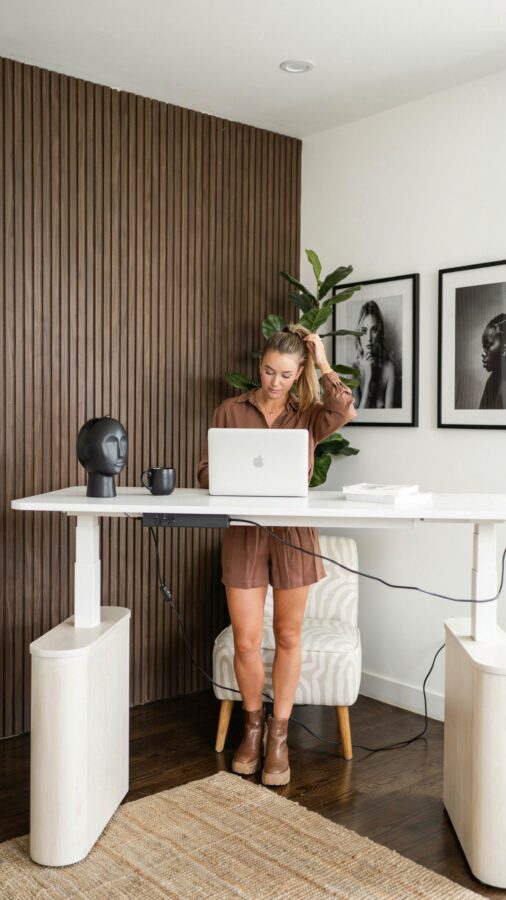
When I first swapped my old dining table for a standing desk for home office, I didn’t expect it to change how I actually felt about working. But after a few weeks of using an electric height adjustable desk, I started noticing something: my back hurt less, my afternoon slump got shorter, and I wasn’t constantly shifting in my chair. This article isn’t a generic review. Instead, it's a collection of ideas and themes I've picked up from setting up my own space and watching colleagues do the same. Think of it as a curated roundup of what actually works when you're trying to boost productivity with an ergonomic desk at home.
Why an Electric Lift Motor Matters for Your Daily Workflow
The first theme I want to talk about is the motor itself. A standing desk is only useful if you actually change positions during the day. I've seen people buy cheap crank-handle desks and end up never adjusting them because it's a hassle. An electric lift motor changes that. You press a button, and the desk glides up or down in a few seconds. That smooth transition makes you more likely to switch between sitting and standing three or four times a day instead of once.
Look for a motor with a decent lifting capacity, at least 150 pounds. Some cheaper models struggle with a heavy monitor and a laptop dock, and they can sound like a dying blender. A good electric motor is quiet and consistent. In my experience, spending a bit more on a dual-motor desk pays off in the long run because it's faster and more stable. You don't want your desk wobbling when you're typing.
Pairing Your Standing Desk with the Right Ergonomic Chair
A standing desk doesn't replace a good chair. It complements one. The second theme in this roundup is the partnership between your desk and your chair. You can't just stand all day, your legs will hate you. You need an ergonomic chair that supports your lower back and allows you to sit with your feet flat on the floor. When I sit, I set my desk height so my elbows are at a 90 degree angle to the keyboard. When I stand, I raise the desk so my wrists stay straight.
The trick is to find a chair that adjusts easily, with seat depth and lumbar support. I personally use a mesh-backed chair because it breathes, and I don't get sweaty during long calls. If you're on a budget, look for a used Steelcase or Herman Miller from an office liquidation sale. They last decades and are way better than most new chairs under $300.
Adding Monitor Arms to Create a Clean, Flexible Setup
This is my favorite hack. A height adjustable desk alone is great, but adding monitor arms takes flexibility to another level. Monitor arms let you move your screen forward, backward, and tilt it without shifting your whole setup. When you stand, you can raise the monitors independently of the desk surface, which means you can keep them at eye level even if the desk is at a different height than you expect.
Here's a quick list of what I look for in monitor arms for a standing desk:
- Gas spring or pneumatic arm so you can adjust with one hand, no tools needed.
- Weight rating that covers your monitor size plus a margin. A 27-inch screen typically needs an arm rated for 10 to 20 pounds.
- VESA compatibility (most monitors use 100x100mm, but double check yours).
- Clamp mount instead of a bolt-through if you have a wooden desktop, it's less destructive and easier to move.
With monitor arms, your desk surface stays cleaner, and you can adjust your screen height instantly without touching the desk motor. It's a small upgrade that makes a huge difference for neck strain.
How to Transition Between Sitting and Standing Without Breaking Focus
One problem I see a lot is people treat standing like an all-or-nothing thing. They stand for two hours straight, get tired, and then sit for the rest of the day and never stand again. The fourth theme here is rhythm. You need a system for transitions that doesn't disrupt your workflow. I use a simple timer on my phone. Every 45 minutes, it buzzes and I decide whether to stand or sit depending on what I'm doing.
If I'm deep in writing, I don't interrupt that flow. I finish the paragraph, then stand. If I'm on a video call, I stand by
#StandingDesk #HomeOffice #ErgonomicDesk #WFHEssentials #HeightAdjustableDesk
Leave a Comment